App Settings
Comic Libraries
Configure your comic library locations. Each library can have a custom name and path.
/e/Manga:/manga), then add the library path here (e.g.,
/manga).
Folder Monitoring
Configure the Watched and Target folders. Other
monitoring features can be adjusted here as well.
Watches your
WATCH folder and renames, converts and moves
anything that lands there into TARGET. Needed for Usenet, DC++
and files you drop into the folder yourself; CLU's own downloads are
processed either way. Takes effect when you save, without a restart.
Enables auto-conversion of CBR/RAR files to CBZ in your Watch folder.
If enabled, the app will process files in sub-directories of your
/downloads/temp folder.
If enabled, when processing files in your
/downloads/temp folder, the
sub-dirctories will be moved as well.
When a downloaded directory contains only one file, consolidate it into a series folder by stripping the issue number from the directory name. (e.g.,
PEP Comics 140/ → PEP Comics/)
Files leaving your
/downloads/temp folder have scanner
and release-group tags and other clutter removed, leaving a name like
Series 001 (2024).cbz. Works from the file name alone, so no
metadata is needed. This is not renaming from metadata; with
Name Files with My Own Pattern on, your pattern is used instead.
Automatically removes temporary download files (.crdownload, .tmp, .part) from the downloads folder.
Trash Can
/cache/trash).
Directory & File Processing Settings
Settings related to Directory processing features.
If enabled, when performing CBR --> CBZ conversion on a directory, CLU will convert all files in subdirectories as well.
Settings related to Directory & File processing features.
folder.png generated in the background. An image you
uploaded yourself is never replaced. Turn this off to generate
them only from the folder three-dots menu.
Custom Naming Settings
Your own naming convention for comic files, built from variables. Without
one, CLU uses its built-in clean-up name (Series 001 (2024)).
Bulk and automatic tagging rename each comic they tag to this pattern, filled from its metadata. With Clean Up File Names on, files leaving WATCH use it too, filled from the file name and any ComicInfo.xml. A token with nothing to fill it is left out.
After you fetch metadata for a single comic, rename it from that metadata, to your pattern or else to
Series 001. Bulk and automatic
tagging follow Name Files with My Own Pattern instead.
{series_name}, {issue_number}, {volume_number}
(can come from the file name);
{issue_title}, {issue_year} (this issue's year),
{issue_month_M} (June), {issue_month_m} (06)
(need metadata: ComicInfo.xml or a tag);
{volume_year} (the series start year from metadata; without it,
the year in the file name).
•
{series_name} {issue_number} ({volume_year}) →
Spider-Man 2099 044 (1992).cbz•
{series_name} [{volume_year}] {issue_number} →
Spider-Man 2099 [1992] 044.cbz•
issue{issue_number} → issue001.cbz•
{volume_number}_{issue_number} → v2_044.cbz•
{series_name} {issue_number} - {issue_title} ({volume_year}) →
Spider-Man 2099 044 - The Last Dance (1992).cbz•
{series_name} {issue_number} ({issue_year}) →
Spider-Man 2099 044 (1992).cbz•
{series_name} {issue_number} ({issue_year}-{issue_month_m}) →
Spider-Man 2099 044 (1992-06).cbz
None strips leading zeros (44), 3 gives
044, 4 gives 0044. Decimal/special issues keep their
suffix (e.g. 44.MU → 044.MU). Applies to all rename logic.
{publisher}, {series_name}, {volume_number},
{start_year}, {issue_number}
•
{publisher}/{series_name}/v{start_year} →
Marvel/Spider-Man 2099/v1992/•
{publisher}/{series_name} → Marvel/Spider-Man 2099/•
{series_name} [{start_year}] → Spider-Man 2099 [1992]/•
{publisher}/{volume_number} → Marvel/v2/
Smart Rename
Renames files using values from series.json and the issue
number parsed from each filename, instead of regex-matching the whole
name. Available from the folder three-dots menu on the Files page.
cvinfo/series.json.
Filename Character Cleanup
Apply after pattern substitution to every rename (custom and default logic). The file extension is always preserved.
Batman 001 → Batman_001
/ → - ). Add a row to replace
or remove any other character; leave "Replace with" empty to remove it.
& is no longer removed by default; add a row for it
if you want it stripped or replaced.
| Character | Replace with | |
|---|---|---|
\
|
||
/
|
||
:
|
||
*
|
||
?
|
||
"
|
||
<
|
||
>
|
||
|
|
||
$
|
||
;
|
Automatic Metadata
When a comic is moved into a folder that has a
cvinfo file, CLU looks the issue up and writes
ComicInfo.xml for it. Files that already carry metadata are
never touched.
Turn this off to keep moves purely as moves. Metadata can still be fetched on demand from the Files page or a bulk Fetch Metadata job.
Metadata Match Validation
Cross-check the date of a matched issue against the year in the filename, so a wrong series match is caught instead of being written into the file. Applies to automatic lookups only — a series you pick yourself is never second-guessed.
Log only reports conflicts without changing what is written — run this first to see what the check would do to your library. Enforce sends a conflicting match for review instead of tagging the file.
How far the dates may disagree before the match is treated as wrong. Cover dates, on-sale dates and reprints routinely differ by a year or two.
API Download Configuration
These options, along with the Chrome extension, will let you `right-click`
links and send them to CLU to be downloaded to your /watch folder.
Download Provider Priority
Set the order CLU tries download providers from GetComics. If a provider fails or its link isn't available, CLU tries the next one.
Search Variant Settings
Configure how GetComics handles different publication types and format variants during search matching.
A pack is a download holding more than one issue, such as "Batman #1 – 50" or the "#1 – 15" part of a post split into several downloads. When on, the scheduled download and "Check for Missing Issues" take a pack that contains a missing issue if no single-issue download is found. When off, that issue stays missing. Downloads you pick from a search window and Weekly Packs are not affected.
GetComics Wanted Issues Simulation
Simulate the full wanted-issues search across all tracked series. Shows exactly what would be searched, found, scored, and downloaded — without making any actual downloads.
Client API Access
Generate a long-lived bearer token for the offline mobile/desktop
reader app. The client sends it as Authorization: Bearer <token> on
every request to /api/v1/*.
/api/v1/*. Rotate it to revoke access from old clients.
Controls how the offline reader navigates your library. Clients can override per request
with ?mode=metadata or ?mode=filesystem.
ComicInfo.xml.
Filesystem view mirrors the folders under your data directory — same as
the main /collection browser.
Komga Reading Sync
Sync reading history and progress from your Komga server to CLU.
Library Path Mapping
Map each CLU library to its corresponding Komga path prefix. Leave the Komga path empty to skip a library during sync.
Loading libraries...
Sync Schedule
Provider Credentials
Configure API credentials for metadata providers. Credentials are stored encrypted.
Library Provider Settings
Configure which metadata providers to use for each library and their priority order.
series.json Provider
Which provider fills series.json (the title, status and summary
Komga reads). Auto follows each library's provider order above. If the chosen
provider has no description, the next one supplies it.
Download Clients
Configure a Usenet download client (SABnzbd or NZBGet). Credentials are stored encrypted. Mark one client as active — completed downloads are handed to your library.
Indexers
Add one or more Newznab-compatible indexers. Drag priority with the arrows — higher indexers are searched first. API keys are stored encrypted.
Source Priority
Which download sources the auto-download engine uses, and the order it tries them in. A source that is off is never tried automatically, but can still be searched by hand.
Performance & Timeout Settings
Configure timeout settings for large file operations and performance optimizations.
Timezone Settings
Set your local timezone for accurate reading history tracking.
Cache Management
Clear cached data to refresh statistics and file listings.
Missing Issue Configuration
Update these settings to ignore terms or files when the app is performing a Missing Issue scan.
Logging & Debugging
Configure application logging settings. Debug logging provides detailed diagnostic information useful for troubleshooting.
When enabled, detailed debug messages will appear in the App Logs. This can help with troubleshooting but may increase log file size. Changes take effect after saving.
ComicInfo.XML Update Settings
Enable/Disable features for updating or cleaning ComicInfo.xml
files. This proecess runs on a single directory, extracts the ComicInfo.xml file,
reads and makes updates and then recompresses the file.
Reads the alpha-numeric first file in the directory and attempts to extract the 4-digit year from the filename.
If enabled, when the ComicInfo.xml update function is run, the
Comments will have all headers, bold text and tables removed.
If enabled, when the ComicInfo.xml update function is run, 'Covers & Creators' tables will be removed from the
Comments.
Current Database
SQLite file size and row counts per table.
–| Table | Rows |
|---|---|
| Loading… | |
Health & Maintenance
Check the database for damage, reclaim unused space and flush the write-ahead log. Safe to run while the app is in use.
Recent database errors
SQLite failures the app would otherwise have swallowed. An empty list here is good news.
| When | Kind | Where | Message |
|---|---|---|---|
| Loading… | |||
Recovery
If the database is damaged, salvage reads out everything still readable and builds a clean copy. It never modifies the current database — you see exactly how many rows survived before deciding whether to install it.
Salvaged copy ready
| Table | Before | After | Change |
|---|
Quarantined copies
Snapshots of the database taken when corruption was detected. They are never offered for restore — they contain the damaged file — but they are the only surviving copy of what was lost.
| Filename | Created | Size | Action |
|---|
Backups
Auto-created on container start (when the DB has changed). Up to 3 retained, plus any manual or pre-restore snapshots.
| Filename | Created | Size | Action |
|---|---|---|---|
| Loading… | |||
Push Notifications
Send a push when downloads finish and when missing issues land in your library. Powered by Apprise, which supports Discord, Telegram, ntfy, Gotify, Slack, email and 100+ other services.
# are ignored,
so you can annotate or temporarily disable a target.
See the Apprise wiki for each service's URL format.
Notify me when…
Default Theme
The theme for users who haven't picked their own. Themes provided by Bootswatch, plus Gruvbox and Catppuccin. To change only your own theme, go to My Account → Appearance.
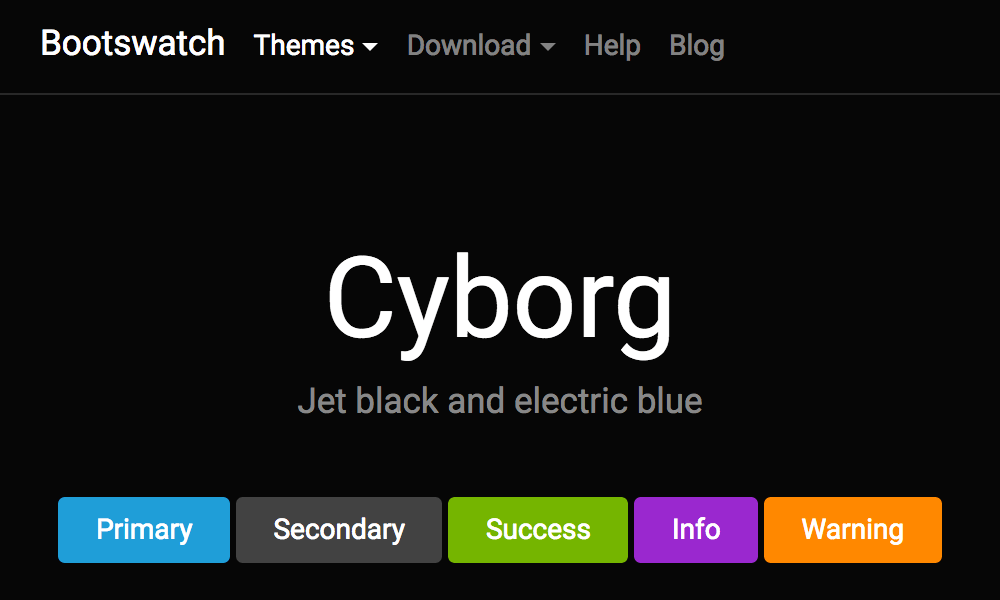
Save settings to apply this theme.
Default Dashboard Layout
Which sections appear on the collection dashboard, and in what order, for users who haven't set their own. To change only your own layout, go to My Account → Dashboard Layout.
-
Favorite Collections
-
Continue Reading
-
On the Stack
-
Want to Read
-
Recently Added
-
Discover / Recommendations (Also requires Recommendations enabled)
-
Library
Folder Thumbnail Style
How cover art is composed for folders in
Browse Library.
This is site-wide, not per user: the art is a real
folder.png written into each folder, so everyone
sees the same image.
Recommendation Service
Configure AI-powered recommendations for your reading list. Use an API key from a hosted provider, or a local model served by Ollama, LM Studio or any other OpenAI-compatible server.
/v1. Ollama:
http://host.docker.internal:11434/v1; LM Studio:
http://host.docker.internal:1234/v1. On Linux, add
extra_hosts: ["host.docker.internal:host-gateway"] to the CLU service
in docker-compose. Left blank, the OPENAI_BASE_URL environment variable
is used.